Category: Blog

  • ytbulk

    YTBulk Downloader

    A robust Python tool for bulk downloading YouTube videos with proxy support, configurable resolution settings, and S3 storage integration.

    Features

    • Bulk video download from CSV lists
    • Smart proxy management with automatic testing and failover
    • Configurable video resolution settings
    • Concurrent downloads with thread pooling
    • S3 storage integration
    • Progress tracking and persistence
    • Separate video and audio download options
    • Comprehensive error handling and logging

    Installation

    1. Clone the repository
    2. Install dependencies:
    pip install -r requirements.txt

    Configuration

    Create a .env file with the following settings:

    YTBULK_MAX_RETRIES=3
    YTBULK_MAX_CONCURRENT=5
    YTBULK_ERROR_THRESHOLD=10
    YTBULK_TEST_VIDEO=<video_id>
    YTBULK_PROXY_LIST_URL=<proxy_list_url>
    YTBULK_PROXY_MIN_SPEED=1.0
    YTBULK_DEFAULT_RESOLUTION=1080p

    Configuration Options

    • YTBULK_MAX_RETRIES: Maximum retry attempts per download
    • YTBULK_MAX_CONCURRENT: Maximum concurrent downloads
    • YTBULK_ERROR_THRESHOLD: Error threshold before stopping
    • YTBULK_TEST_VIDEO: Video ID used for proxy testing
    • YTBULK_PROXY_LIST_URL: URL to fetch proxy list
    • YTBULK_PROXY_MIN_SPEED: Minimum acceptable proxy speed (MB/s)
    • YTBULK_DEFAULT_RESOLUTION: Default video resolution (360p, 480p, 720p, 1080p, 4K)

    Usage

    python -m cli CSV_FILE ID_COLUMN --work-dir WORK_DIR --bucket S3_BUCKET [OPTIONS]

    Arguments

    • CSV_FILE: Path to CSV file containing video IDs
    • ID_COLUMN: Name of the column containing YouTube video IDs
    • --work-dir: Working directory for temporary files
    • --bucket: S3 bucket name for storage
    • --max-resolution: Maximum video resolution (optional)
    • --video/--no-video: Enable/disable video download
    • --audio/--no-audio: Enable/disable audio download

    Example

    python -m cli videos.csv video_id --work-dir ./downloads --bucket my-youtube-bucket --max-resolution 720p

    Architecture

    Core Components

    1. YTBulkConfig (config.py)

      • Handles configuration loading and validation
      • Environment variable management
      • Resolution settings
    2. YTBulkProxyManager (proxies.py)

      • Manages proxy pool
      • Tests proxy performance
      • Handles proxy rotation and failover
      • Persists proxy status
    3. YTBulkStorage (storage.py)

      • Manages local and S3 storage
      • Handles file organization
      • Manages metadata
      • Tracks processed videos
    4. YTBulkDownloader (download.py)

      • Core download functionality
      • Video format selection
      • Download process management
    5. YTBulkCLI (cli.py)

      • Command-line interface
      • Progress tracking
      • Concurrent download management

    Proxy Management

    The proxy system features:

    • Automatic proxy testing
    • Speed-based verification
    • State persistence
    • Automatic failover
    • Concurrent proxy usage

    Storage System

    Files are organized in the following structure:

    work_dir/
    ├── cache/
    │   └── proxies.json
    └── downloads/
        └── {channel_id}/
            └── {video_id}/
                ├── {video_id}.mp4
                ├── {video_id}.m4a
                └── {video_id}.info.json
    

    Error Handling

    • Comprehensive error logging
    • Automatic retry mechanism
    • Proxy failover
    • File integrity verification
    • S3 upload confirmation

    Contributing

    1. Fork the repository
    2. Create a feature branch
    3. Commit your changes
    4. Push to the branch
    5. Create a Pull Request

    License

    MIT License

    Dependencies

    • yt-dlp: YouTube download functionality
    • click: Command line interface
    • python-dotenv: Environment configuration
    • tqdm: Progress bars
    • boto3: AWS S3 integration

    Visit original content creator repository

  • amiko_wx

    amiko_linux

    AmiKo/CoMed for Linux done with wxWidgets and C++, 64 bit.

    Prerequisites:

    • CMake

    • GTK 3

        $ sudo apt install libgtk-3-dev
      
    • WebKit2

        $ sudo apt install libwebkit2gtk-4.0-dev
      
    • SQlite is built-in into the application, so there is no dependency on system libraries.

    • JSON nlohmann

        $ git submodule init
        $ git submodule update
      

      then enable this in steps.conf

        STEP_CONFIGURE_JSON=y
        STEP_BUILD_JSON=y
        STEP_COPY_LANG_FILES=y
      
    • Libcurl

      Install:

        sudo apt install libcurl4-openssl-dev
      

      Or build:

        STEP_DOWNLOAD_SOURCES_CURL=y
        STEP_CONFIGURE_CURL=y
        STEP_BUILD_CURL=y
      
    • OpenSSL development libraries, required for the calculation of the patient hash (SHA256)

        $ sudo apt install libssl-dev
      
    • Smart card support

      • Developers

          $ sudo apt install libpcsclite-dev
        
      • Developers and users

          $ sudo apt install pcscd
        
    • uuidgen for the generation of prescription UUIDs

        $ uuidgen
      
    • To install dependencies on Gentoo:

        $ emerge net-libs/webkit-gtk x11-libs/wxGTK sys-apps/pcsc-lite
      

    Build Script

    1. Download and install latest wxWidgets from source using build script.
    2. Build script also has to download all data files, see OSX version.
    3. Build script has to build executables named AmiKo and CoMed.

    Config Hack

    In the file ~/AmiKo you can set language=57 on the first line. That will put the interface to English. In case you want to test in English.

    Setup

    1. Run build.sh
    2. Edit steps.conf
    3. Edit seed.conf
    4. Run build.sh again.

    Notes when building wxWidgets and SQLite

    1. For Mac in steps.conf

    STEP_CONFIGURE_WXWIDGETS=y
    STEP_COMPILE_WXWIDGETS=y
    
    STEP_CONFIGURE_JSON=y
    STEP_BUILD_JSON=y
    
    1. For Mac in seed.conf
    CONFIG_GENERATOR_MK=y
    

    Notes when building AmiKo/CoMed

    1. For Mac in steps.conf

    STEP_CONFIGURE_APP=y
    STEP_COMPILE_APP=y
    
    1. For Mac in seed.conf
    CONFIG_GENERATOR_XC=y
    

    macOS Installer

    1. Create a .pkg Installer for macOS that installs all the DB files in to ~/.AmiKo or ~/.CoMed

    Visit original content creator repository

  • straug

    Data Augmentation for Scene Text Recognition

    (Pronounced as “strog“)

    Paper

    Why it matters?

    Scene Text Recognition (STR) requires data augmentation functions that are different from object recognition. STRAug is data augmentation designed for STR. It offers 36 data augmentation functions that are sorted into 8 groups. Each function supports 3 levels or magnitudes of severity or intensity.

    Given a source image:

    it can be transformed as follows:

    1. warp.py – to generate Curve, Distort, Stretch (or Elastic) deformations
    Curve Distort Stretch
    1. geometry.py – to generate Perspective, Rotation, Shrink deformations
    Perspective Rotation Shrink
    1. pattern.py – to create different grids: Grid, VGrid, HGrid, RectGrid, EllipseGrid
    Grid VGrid HGrid RectGrid EllipseGrid
    1. blur.py – to generate synthetic blur: GaussianBlur, DefocusBlur, MotionBlur, GlassBlur, ZoomBlur
    GaussianBlur DefocusBlur MotionBlur GlassBlur ZoomBlur
    1. noise.py – to add noise: GaussianNoise, ShotNoise, ImpulseNoise, SpeckleNoise
    GaussianNoise ShotNoise ImpulseNoise SpeckleNoise
    1. weather.py – to simulate certain weather conditions: Fog, Snow, Frost, Rain, Shadow
    Fog Snow Frost Rain Shadow
    1. camera.py – to simulate camera sensor tuning and image compression/resizing: Contrast, Brightness, JpegCompression, Pixelate
    Contrast Brightness JpegCompression Pixelate
    1. process.py – all other image processing issues: Posterize, Solarize, Invert, Equalize, AutoContrast, Sharpness, Color
    Posterize Solarize Invert Equalize
    AutoContrast Sharpness Color

    Pip install

    pip3 install straug
    

    How to use

    Command line (e.g. input image is nokia.png):

    >>> from straug.warp import Curve
    >>> from PIL import Image
    >>> img = Image.open("nokia.png")
    >>> img = Curve()(img, mag=3)
    >>> img.save("curved_nokia.png")
    

    Python script (see test.py):

    python3 test.py --image=<target image>

    For example:

    python3 test.py --image=images/telekom.png

    The corrupted images are in results directory.

    If you want to randomly apply only the desired augmentation types among multiple augmentations, see test_random_aug.py

    Reference

    • Image corruptions (eg blur, noise, camera effects, fog, frost, etc) are based on the work of Hendrycks et al.

    Citation

    If you find this work useful, please cite:

    @inproceedings{atienza2021data,
      title={Data Augmentation for Scene Text Recognition},
      author={Atienza, Rowel},
      booktitle={Proceedings of the IEEE/CVF International Conference on Computer Vision},
      pages={1561--1570},
      year={2021}
    }
    
    Visit original content creator repository
  • ebsynth_utility

    ebsynth_utility

    Overview

    AUTOMATIC1111 UI extension for creating videos using img2img and ebsynth.

    This extension allows you to output edited videos using ebsynth.(AE is not required)

    With Controlnet installed, I have confirmed that all features of this extension are working properly!
    Controlnet is a must for video editing, so I recommend installing it.
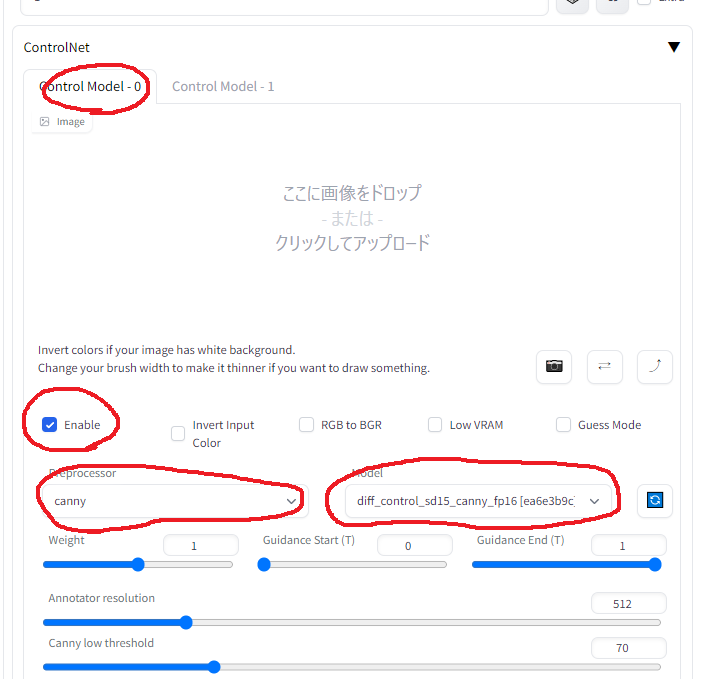
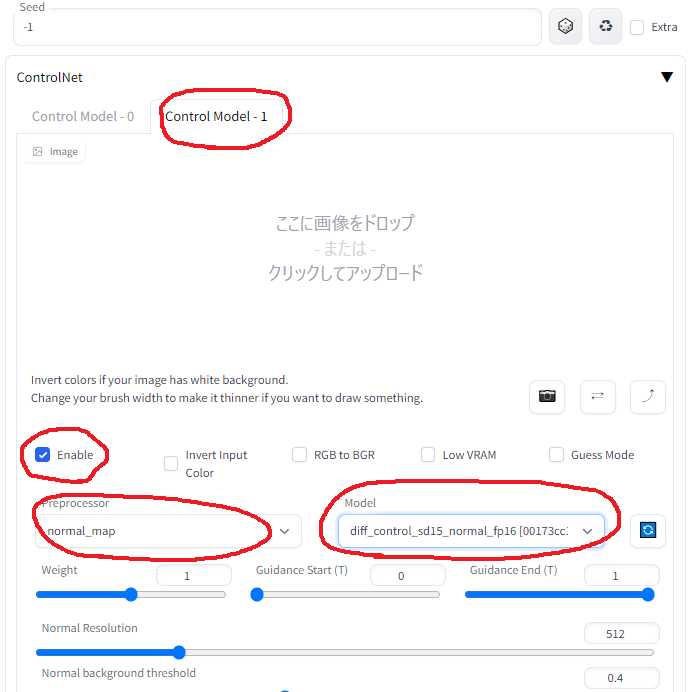
    Multi ControlNet(“canny” + “normal map”) would be suitable for video editing.

    I modified animatediff-cli to create a txt2video tool that allows flexible prompt specification. You can use it if you like.
    sample2.mp4

    Example

    • The following sample is raw output of this extension.

    sample 1 mask with clipseg

    • first from left : original
    • second from left : masking “cat” exclude “finger”
    • third from left : masking “cat head”
    • right : color corrected with color-matcher (see stage 3.5)
    • Multiple targets can also be specified.(e.g. cat,dog,boy,girl)
    sample_clipseg_and_colormacher.mp4

    sample 2 blend background

    • person : masterpiece, best quality, masterpiece, 1girl, masterpiece, best quality,anime screencap, anime style
    • background : cyberpunk, factory, room ,anime screencap, anime style
    • It is also possible to blend with your favorite videos.
    sample6.mp4

    sample 3 auto tagging

    • left : original
    • center : apply the same prompts in all keyframes
    • right : apply auto tagging by deepdanbooru in all keyframes
    • This function improves the detailed changes in facial expressions, hand expressions, etc.
      In the sample video, the “closed_eyes” and “hands_on_own_face” tags have been added to better represent eye blinks and hands brought in front of the face.
    sample_autotag.mp4

    sample 4 auto tagging (apply lora dynamically)

    • left : apply auto tagging by deepdanbooru in all keyframes
    • right : apply auto tagging by deepdanbooru in all keyframes + apply “anyahehface” lora dynamically
    • Added the function to dynamically apply TI, hypernet, Lora, and additional prompts according to automatically attached tags.
      In the sample video, if the “smile” tag is given, the lora and lora trigger keywords are set to be added according to the strength of the “smile” tag.
      Also, since automatically added tags are sometimes incorrect, unnecessary tags are listed in the blacklist.
      Here is the actual configuration file used. placed in “Project directory” for use.
    Sample.Anyaheh.mp4

    Installation


    Usage

    • Go to [Ebsynth Utility] tab.
    • Create an empty directory somewhere, and fill in the “Project directory” field.
    • Place the video you want to edit from somewhere, and fill in the “Original Movie Path” field. Use short videos of a few seconds at first.
    • Select stage 1 and Generate.
    • Execute in order from stage 1 to 7. Progress during the process is not reflected in webui, so please check the console screen. If you see “completed.” in webui, it is completed.
      (In the current latest webui, it seems to cause an error if you do not drop the image on the main screen of img2img.
      Please drop the image as it does not affect the result.)

    Note 1

    For reference, here’s what I did when I edited a 1280×720 30fps 15sec video based on

    Stage 1

    There is nothing to configure.
    All frames of the video and mask images for all frames are generated.

    Stage 2

    In the implementation of this extension, the keyframe interval is chosen to be shorter where there is a lot of motion and longer where there is little motion.
    If the animation breaks up, increase the keyframe, if it flickers, decrease the keyframe.
    First, generate one time with the default settings and go straight ahead without worrying about the result.

    Stage 3

    Select one of the keyframes, throw it to img2img, and run [Interrogate DeepBooru].
    Delete unwanted words such as blur from the displayed prompt.
    Fill in the rest of the settings as you would normally do for image generation.

    Here is the settings I used.

    • Sampling method : Euler a
    • Sampling Steps : 50
    • Width : 960
    • Height : 512
    • CFG Scale : 20
    • Denoising strength : 0.2

    Here is the settings for extension.

    • Mask Mode(Override img2img Mask mode) : Normal
    • Img2Img Repeat Count (Loop Back) : 5
    • Add N to seed when repeating : 1
    • use Face Crop img2img : True
    • Face Detection Method : YuNet
    • Max Crop Size : 1024
    • Face Denoising Strength : 0.25
    • Face Area Magnification : 1.5 (The larger the number, the closer to the model’s painting style, but the more likely it is to shift when merged with the body.)
    • Enable Face Prompt : False

    Trial and error in this process is the most time-consuming part.
    Monitor the destination folder and if you do not like results, interrupt and change the settings.
    [Prompt][Denoising strength] and [Face Denoising Strength] settings when using Face Crop img2img will greatly affect the result.
    For more information on Face Crop img2img, check here

    If you have lots of memory to spare, increasing the width and height values while maintaining the aspect ratio may greatly improve results.

    This extension may help with the adjustment.
    https://github.com/s9roll7/img2img_for_all_method


    The information above is from a time when there was no controlnet.
    When controlnet are used together (especially multi-controlnets), Even setting “Denoising strength” to a high value works well, and even setting it to 1.0 produces meaningful results.
    If “Denoising strength” is set to a high value, “Loop Back” can be set to 1.


    Stage 4

    Scale it up or down and process it to exactly the same size as the original video.
    This process should only need to be done once.

    • Width : 1280
    • Height : 720
    • Upscaler 1 : R-ESRGAN 4x+
    • Upscaler 2 : R-ESRGAN 4x+ Anime6B
    • Upscaler 2 visibility : 0.5
    • GFPGAN visibility : 1
    • CodeFormer visibility : 0
    • CodeFormer weight : 0

    Stage 5

    There is nothing to configure.
    .ebs file will be generated.

    Stage 6

    Run the .ebs file.
    I wouldn’t change the settings, but you could adjust the .ebs settings.

    Stage 7

    Finally, output the video.
    In my case, the entire process from 1 to 7 took about 30 minutes.

    • Crossfade blend rate : 1.0
    • Export type : mp4

    Note 2 : How to use multi-controlnet together

    in webui setting

    controlnet_setting

    In controlnet settings in img2img tab(for controlnet 0)

    controlnet_0

    In controlnet settings in img2img tab(for controlnet 1)

    controlnet_1

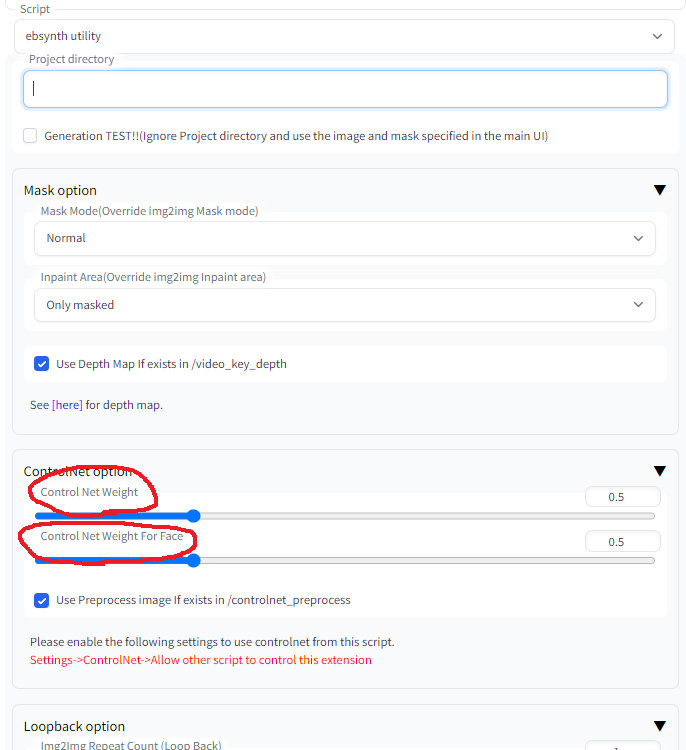
    In ebsynth_utility settings in img2img tab

    Warning : “Weight” in the controlnet settings is overridden by the following values controlnet_option_in_ebsynthutil


    Note 3 : How to use clipseg

    clipseg

    Visit original content creator repository
  • ObfuscateMe

    ObfuscateMe 🔒

    ObfuscateMe Logo

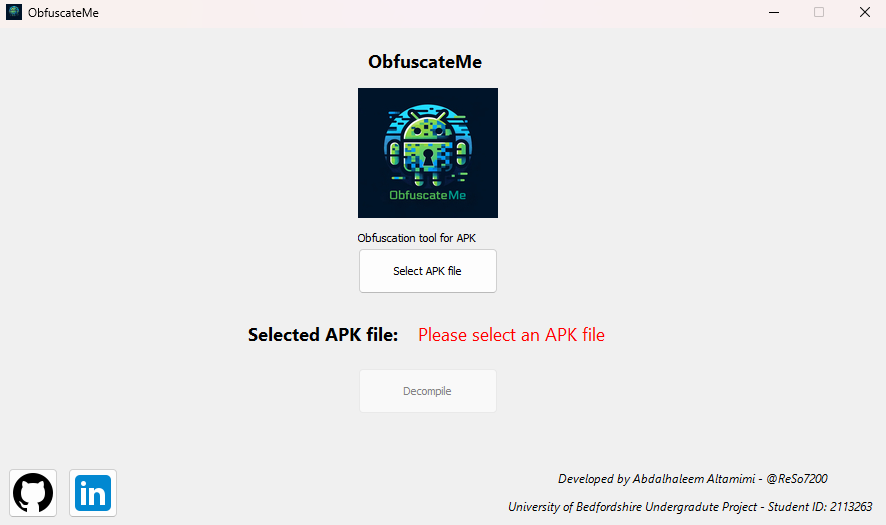
    ObfuscateMe is a very simple APK obfuscator with a graphical user interface (GUI) that helps developers obscure their Android application code by refactoring class names, method names, and field variables. It was developed as part of my undergraduate project at the University of Bedfordshire.

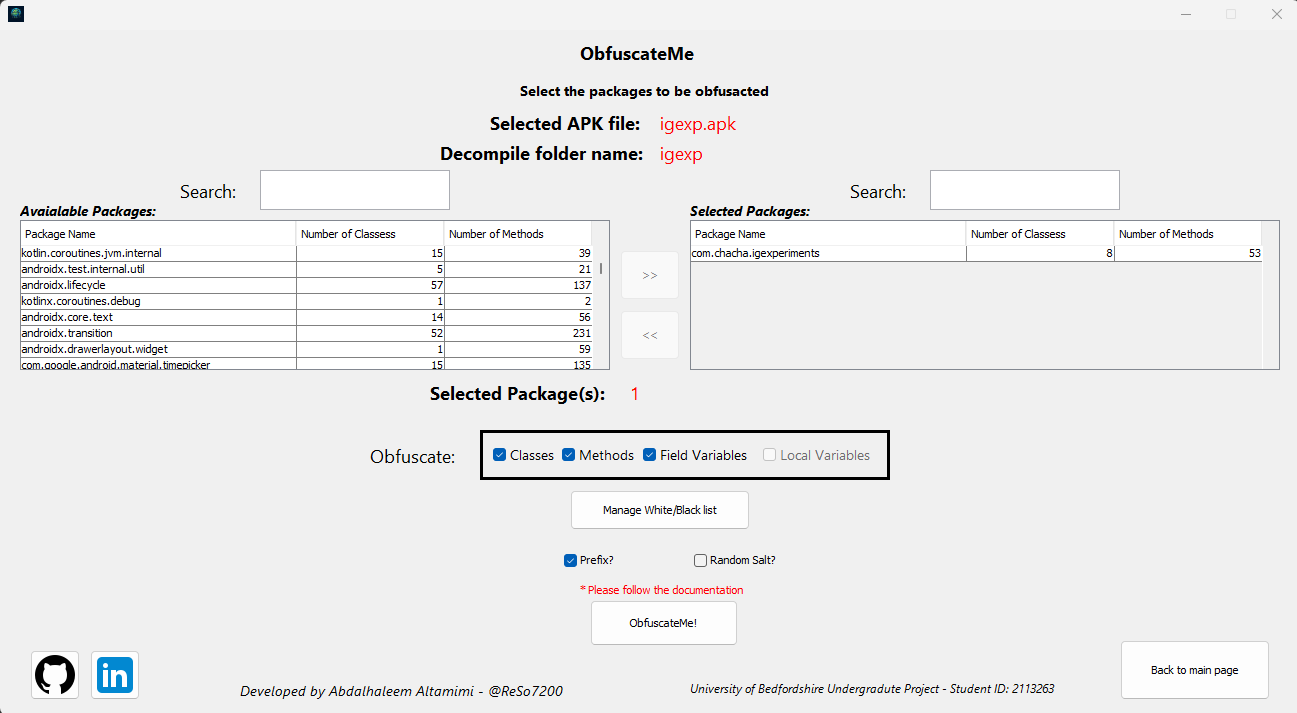
    The GUI allows users to easily select the APK, packages, classes, and methods to obfuscate, making the process more intuitive and user-friendly.

    The goal is to make reverse engineering more difficult by renaming sensitive parts of the APK code, making it harder for unauthorized parties to understand the logic behind the app. Although it’s simple and easy to use, it also provides flexible options for obfuscation and blacklisting specific parts of the code from obfuscation.


    Features ✨

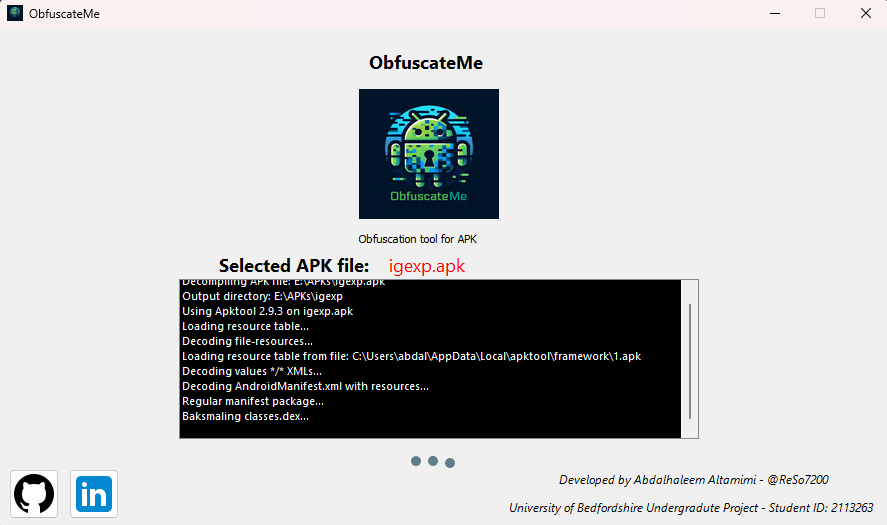
    • APK Decompilation 🔍: Decompile APK files into readable smali code.
    • Obfuscation 🔏🌀: Refactor class names, method names, and field variables for enhanced security.
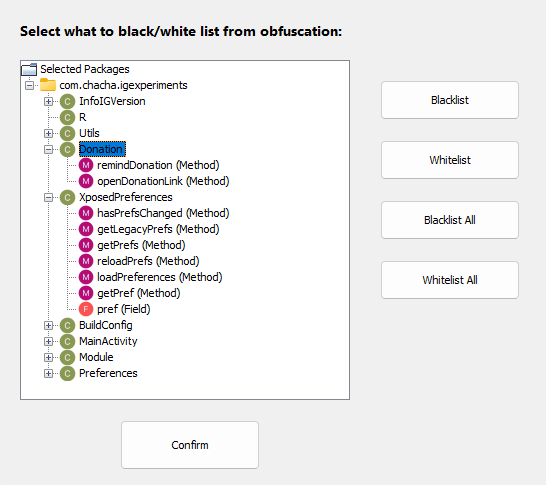
    • Blacklisting⚫📋/Whitelisting⚪📋: Select packages, classes, or methods that should not be obfuscated.
    • Recompilation & Signing 🔄🔐: Recompile the APK and sign it after obfuscation, ready for distribution.

    Usage 📖

    1. Select APK File: Choose the APK you want to obfuscate.

    2. Select Packages: Use the graphical interface to select the packages that should be included in the obfuscation process. You can review the available packages in your APK and make selections easily.

    3. Choose Obfuscation Options:

      • You can choose to obfuscate:
        • Classes
        • Methods
        • Field Variables
      • There are additional options like adding a prefix to obfuscated names or including a dynamic salt to ensure randomness.
    4. Blacklist Selection:
      You can choose specific classes, methods, or fields to exclude from obfuscation:

      • Manage Blacklist/Whitelist: The tool provides a tree view of the APK structure, allowing you to manually select or deselect parts of the code for obfuscation.
      • Class and Method Blacklisting: Entire classes and specific methods can be blacklisted from the obfuscation process to prevent them from being renamed.
    5. Refactoring: After configuring your selections, the tool will refactor the chosen components. It will also generate a mapping file for future reference, showing the original and obfuscated names.

    6. Recompilation & Signing: Once the obfuscation is complete:

      • Recompile the APK.
      • Optionally, sign the APK using either a custom key 🔑 or an auto-generated key to prepare it for distribution.

    Setup 🚀

    You can now download the ObfuscateMe setup from the releases page. The setup file allows for easy installation and execution of the tool. Here’s how to get started:

    1. Download the Latest Release: Head to the releases page and download the latest setup file.

    2. Run the Setup: Follow the installation instructions to install the tool on your machine.

    3. Launch ObfuscateMe: Once installed, you can easily launch ObfuscateMe and start obfuscating your APKs.


    Tools Used 🛠️

    Special thanks to the following tools used in this project:

    • APKTool: For APK decompilation and recompilation.
    • Uber APK Signer: For easy APK signing after the recompilation process.

    Known Issues & Future Improvements 🛠️

    While ObfuscateMe is simple and functional, a few areas require improvements:

    1. Local Variable Obfuscation 🐛: Currently, variables declared within methods are not refactored. This leaves some sections of the code vulnerable.

    2. Method Refactoring Conflicts 🔄: The tool may refactor methods with the same name in different classes, even if one of those classes is blacklisted. A more precise system to avoid refactoring conflicts between different classes is needed.

    3. Performance Enhancements 🐢: As APK sizes grow, refactoring can become slower. Optimizing the tool for larger APKs is part of the future roadmap.


    Screenshots 📸


    Main Class

    Main Class – Decompiling

    Package Selection

    Blacklisting

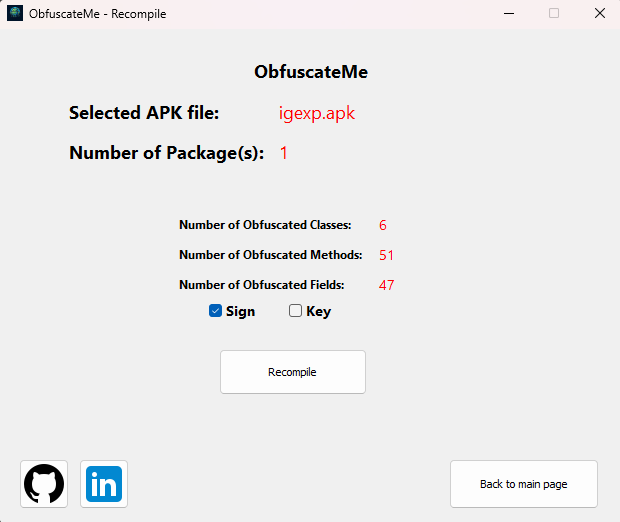
    Recompile Class

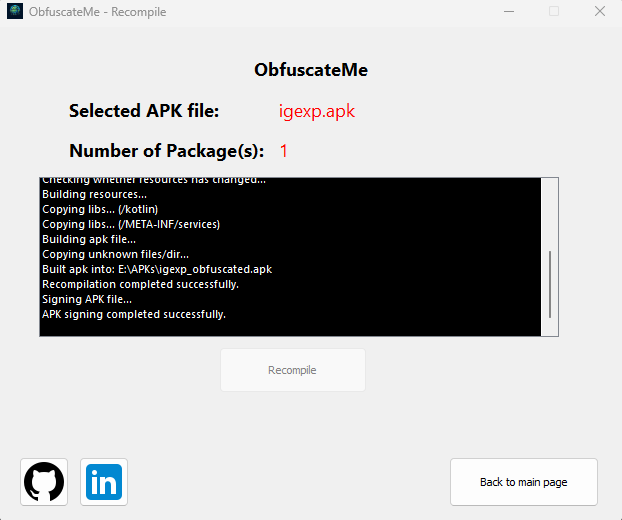
    Recompiling and Signing

    Contribution 🤝

    Feel free to fork the project, submit pull requests, or open issues if you encounter any bugs or have suggestions. I appreciate any contributions that help make ObfuscateMe better!

    Note: Please use NetBeans IDE for development, as the GUI was generated using the NetBeans GUI builder, and it ensures smooth editing and customization of the interface.


    Contact 📧

    For any queries, feel free to contact me:


    License ⚖️

    This project is licensed under the MIT License.


    Final Thoughts 💭

    ObfuscateMe is a great start for simple APK obfuscation needs, and while it still has room for improvement, it provides a solid foundation for anyone looking to protect their Android apps from reverse engineering. Thanks for checking out the project! 😊

    Happy obfuscating! 🔒📱

    Visit original content creator repository
  • hydra_login2f

    hydra_login2f

    hydra_login2f is a secure login provider for ORY Hydra OAuth2
    Server
    . hydra_login2f implements
    two-factor authentication via email.

    Installation

    hydra_login2f can be deployed directly from a docker image. You can
    find a working example in the example/ directory.

    Configuration

    hydra_login2f‘s behavior can be tuned with environment
    variables. Here are the most important settings with their default
    values:

    # The port on which `hydra_login2f` will run.
    PORT=8000
    
    # The path to the login page (ORY Hydra's `OAUTH2_LOGIN_URL`):
    LOGIN_PATH='/login'
    
    # The path to the dummy consent page (ORY Hydra's `OAUTH2_CONSENT_URL`).
    # `hydra_login2f` implements a dummy consent page, which accepts all
    # consent requests unconditionally, without showing any UI to the user.
    # This is sometimes useful, especially during testing.
    CONSENT_PATH='/consent'
    
    # The prefix added the user ID to form the Oauth2 subject field. For
    # example, if SUBJECT_PREFIX='user:', the OAuth2 subject for the user
    # with ID=1234 would be 'user:1234'.
    SUBJECT_PREFIX=''
    
    # Set this to a random, long string. This secret is used only to sign
    # the session cookies which guide the users' experience, and therefore it
    # IS NOT of critical importance to keep this secret safe.
    SECRET_KEY='dummy-secret'
    
    # Set this to the name of your site, as it is known to your users.
    SITE_TITLE='My site name'
    
    # Set this to an URL that tells more about your site.
    ABOUT_URL='https://github.com/epandurski/hydra_login2f'
    
    # Optional URL for a custom CSS style-sheet:
    STYLE_URL=''
    
    # Whether to issue recovery codes to your users for additional security
    # ('True' or 'False'). It is probably a good idea to use recovery codes
    # if the account to your service might be more important to your users
    # than their email account.
    USE_RECOVERY_CODE=True
    
    # Whether to hide the "remember me" checkbox from users. If this is set to
    # `True`, the "remember me" checkbox will not be shown. This might be useful
    # when saving the login credentials poses a risk.
    HIDE_REMEMBER_ME_CHECKBOX=False
    
    # Set this to the URL for ORY Hydra's admin API.
    HYDRA_ADMIN_URL='http://hydra:4445'
    
    # Set this to the URL for your Redis server instance. It is highly
    # recommended that your Redis instance is backed by disk storage. If not so,
    # your users might be inconvenienced when your Redis instace is restarted.
    REDIS_URL='redis://localhost:6379/0'
    
    # Set this to the URL for your SQL database server instance. PostgreSQL
    # and MySQL are supported out of the box. Example URLs:
    # - postgresql://user:pass@servername/dbname
    # - mysql+mysqlconnector://user:pass@servername/dbname
    SQLALCHEMY_DATABASE_URI=''
    
    # The size of the database connection pool. If not set, defaults to the
    # engine’s default (usually 5).
    SQLALCHEMY_POOL_SIZE=None
    
    # Controls the number of connections that can be created after the pool
    # reached its maximum size (`SQLALCHEMY_POOL_SIZE`). When those additional
    # connections are returned to the pool, they are disconnected and discarded.
    SQLALCHEMY_MAX_OVERFLOW=None
    
    # Specifies the connection timeout in seconds for the pool.
    SQLALCHEMY_POOL_TIMEOUT=None
    
    # The number of seconds after which a connection is automatically recycled.
    # This is required for MySQL, which removes connections after 8 hours idle
    # by default. It will be automatically set to 2 hours if MySQL is used.
    # Some backends may use a different default timeout value (MariaDB, for
    # example).
    SQLALCHEMY_POOL_RECYCLE=None
    
    # SMTP server connection parameters. You should set `MAIL_DEFAULT_SENDER`
    # to the email address from which you send your outgoing emails to users,
    # "My Site Name <no-reply@my-site.com>" for example.
    MAIL_SERVER='localhost'
    MAIL_PORT=25
    MAIL_USE_TLS=False
    MAIL_USE_SSL=False
    MAIL_USERNAME=None
    MAIL_PASSWORD=None
    MAIL_DEFAULT_SENDER=None
    
    # Parameters for Google reCAPTCHA 2. You should obtain your own public/private
    # key pair from www.google.com/recaptcha, and put it here.
    RECAPTCHA_PUBLIC_KEY='6Lc902MUAAAAAJL22lcbpY3fvg3j4LSERDDQYe37'
    RECAPTCHA_PIVATE_KEY='6Lc902MUAAAAAN--r4vUr8Vr7MU1PF16D9k2Ds9Q'
    
    # Set this to the number of worker processes for handling requests -- a
    # positive integer generally in the 2-4 * $NUM_CORES range.
    GUNICORN_WORKERS=2
    
    # Set this to the number of worker threads for handling requests. (Runs
    # each worker with the specified number of threads.)
    GUNICORN_THREADS=1

    Visit original content creator repository

  • RamanSpecCalibration

    RamanSpecCalibration

    Link to the article | DOI


    This work has been published in the following article:
    Toward standardization of Raman spectroscopy: Accurate wavenumber and intensity calibration using rotational Raman spectra of H2, HD, D2, and vibration–rotation spectrum of O2
    Ankit Raj, Chihiro Kato, Henryk A. Witek and Hiro‐o Hamaguchi
    Journal of Raman Spectroscopy
    10.1002/jrs.5955


    Set of functions in Python and IgorPro’s scripting language for the wavenumber calibration (x-axis) and intensity calibration (or correction of wavelength dependent sensitivity, i.e. y-axis) of Raman spectra. This repository requires the data on the rotational state (J), frequency, and the measured rotational Raman intensities from H2, HD, D2 and O2. Programs in Python and IgorPro are independent and perform the same job.

    • For wavenumber calibration, the pixel positions with error of rotational Raman bands from H2, HD, D2 and rotation-vibration bands from O2 are required, which can be obtained from band fitting. The code does Weighted Orthogonal Distance Regression (weighted ODR) for fitting x-y data pair ( corresponding to pixel – reference wavenumber), both having uncertainties, with a polynomial. Output are the obtained wavenumber axis from fit and an estimate of error.

    • For intensity calibration, the main scheme of the code is for the non-linear weighted minimization to obtain coefficients for a polynomial which represents the wavelength dependent sensitivity. The output is a curve extrapolated to same dimension as required by user for intensity calibration. An independent validation of the obtained sensitivity should be done for a measure of accuracy.


    Why we are doing this?

    Intensity calibration

    In any Raman spectrometer, light scattered by the molecules travels to the detector while passing through/by some optical components (for example, lens, mirrors, grating, etc..) In this process, the scattered light intensity is modulated by the non-uniform reflectance/transmission of the optical components. Reflectance and transmission of the optics are wavenumber dependent. The net modulation to the light intensity, defined as M(ν), over the studied spectral range can be expressed as product(s) of the wavenumber dependent performance of the ith optical element as

    Here, ci is a coefficient and wi(ν) is the wavenumber dependent transmission or reflectance of the ith optical component.

    In most cases, determining the individual performance of each optical element is a cumbersome task. Hence, we limit our focus to approximately determine the relative form of M(ν), from experimental data. By relative form, it is meant that M(ν) is normalized to unity within the studied spectral range. If M(ν) is known, then we can correct the observed intensities in the Raman spectrum by dividing those by M(ν). In general, this is the principle of all intensity calibration procedure in optical spectroscopy.

    In our work, we assume M(ν) ≅ C1(ν) C2(ν) / C0(ν) [The wavenumber dependence in not explicitly stated when C0, C1 and C2 are discussed in the following text. ] The three contributions, C0(ν) to C2(ν) are determined in two steps in this analysis.

    • In the first step, (C0 / C1) correction are determined using the wavenumber axis and the spectrum of a broad band white light source. (See example)
    • C2 is determined from the observed Raman intensities, where the reference or true intensities are known or can be computed. This can be done using (i) pure-rotational Raman bands of molecular hydrogen and isotopologues, (ii) vibration-rotation Raman bands of the same gases and (iii) vibrational Raman bands of some liquids.

    The multiplicative correction to the Raman spectrum for intensity calibration is then : (C0 / C1C2)

    The present work is concerned with the anti-Stokes and Stokes region (from -1100 to 1650 cm-1). For a similar analysis for the higher wavenumber region (from 2300 to 4200 cm-1) see this repository and article.


    Method

    Wavenumber calibration : Fit of the reference transition wavenumbers against the band position in pixels is performed to obtain the wavenumber axis(relative).

    • S. B. Kim, R. M. Hammaker, W. G. Fateley, Appl. Spectrosc. 1986, 40, 412.
    • H. Hamaguchi, Appl. Spectrosc. Rev. 1988, 24, 137.
    • R. L. McCreery, Raman Spectroscopy for Chemical Analysis, John Wiley & Sons, New York, 2000.
    • N. C. Craig, I. W. Levin, Appl. Spectrosc. 1979, 33, 475.

    Intensity calibration : Ratio of intensities from common rotational states are compared to the corresponding theoretical ratio to obtain the wavelength dependent sensitivity curve.

    • H. Okajima, H. Hamaguchi, J. Raman Spectrosc. 2015, 46, 1140. (10.1002/jrs.4731)
    • H. Hamaguchi, I. Harada, T. Shimanouchi, Chem. Lett. 1974, 3, 1405. (cl.1974.1405)

    Input data required

    Wavenumber calibration

    • List of band positions and error (in pixels) of rotational Raman spectra of H2, HD, D2 and rotational-vibrational Raman spectra of O2.

    Intensity calibration

    • List of all data required : rotational state (J), experimental band area ratio (Stokes/ anti-Stokes), theoretical band area ratio (Stokes/anti-Stokes), transition frequency (Stokes) in cm-1, transition frequency (anti-Stokes) in cm-1 and the weight (used for fit). For O2, when using the vibration-rotation transitions (S1- and O1-branch), include the data and the frequencies for these transitions. All of the above correspond to pair of observed bands originating from a common rotational state.

    See specific program’s readme regarding the use of the above data in the program for fit.

    Available programs

    • Set of Igor Procedures
    • A Python module for performing non-linear fit on the above mentioned data set to obtain the wavelength dependent sensitivity.

    Additionally, programs to compute the theoretical pure rotational Raman spectra (for H2, HD and D2) are also included.

    Usage

    Clone the repository or download the zip file. As per your choice of the programming environment ( Python or IgorPro) refer to the specific README inside the folders and proceed.

    Comments

    • On convergence of the minimization scheme in intensity calibration : The convergence of the optimization has been tested with artificial and actual data giving expected results. However, in certain cases convergence in the minimization may not be achieved based on the specific data set and the error in the intensity.

    • Accuracy of the calibration : It is highly suggested to perform an independent validation of the intensity calibration. This validation can be using anti-Stokes to Stokes intensity for determining the sample’s temperature (for checking the accuracy of wavelength sensitivity correction) and calculating the depolarization ratio from spectra (for checking the polarization dependent sensitivity correction). New ideas regarding testing the validity of intensity calibration are welcome. Please give comments in the “Issues” section of this repository.

    Credits

    Non-linear optimization in SciPy : Travis E. Oliphant. Python for Scientific Computing, Computing in Science & Engineering, 9, 10-20 (2007), DOI:10.1109/MCSE.2007.58

    Matplotlib : J. D. Hunter, “Matplotlib: A 2D Graphics Environment”, Computing in Science & Engineering, vol. 9, no. 3, pp. 90-95, 2007.

    Orthogonal Distance Regression as used in IgorPro and SciPy : (i) P. T. Boggs, R. Byrd, R. Schnabel, SIAM J. Sci. Comput. 1987, 8, 1052. (ii) P. T. Boggs, J. R. Donaldson, R. h. Byrd, R. B. Schnabel, ACM Trans. Math. Softw. 1989, 15, 348. (iii) J. W. Zwolak, P. T. Boggs, L. T. Watson, ACM Trans. Math. Softw. 2007, 33, 27. (iv) P. T. Boggs and J. E. Rogers, “Orthogonal Distance Regression,” in “Statistical analysis of measurement error models and applications: proceedings of the AMS-IMS-SIAM joint summer research conference held June 10-16, 1989,” Contemporary Mathematics, vol. 112, pg. 186, 1990.

    Support/Questions/Issues

    Please use “Issues” section for asking questions and reporting issues.


    This work has been published in the following article:
    Toward standardization of Raman spectroscopy: Accurate wavenumber and intensity calibration using rotational Raman spectra of H2, HD, D2, and vibration–rotation spectrum of O2
    Ankit Raj, Chihiro Kato, Henryk A. Witek and Hiro‐o Hamaguchi
    Journal of Raman Spectroscopy
    10.1002/jrs.5955


    Other repositories on this topic :

    The present repository is concerned with the anti-Stokes and Stokes region spanning from -1040 to 1700 cm-1 using H2, HD, D2 and O2. In a different work, spectral region in the higher wavenumber(from 2300 to 4200 cm-1) was investigated.

    Accurate intensity calibration of multichannel spectrometers using Raman intensity ratios
    Ankit Raj, Chihiro Kato, Henryk A. Witek and Hiro‐o Hamaguchi
    Journal of Raman Spectroscopy
    10.1002/jrs.6221

    See online repository IntensityCalbr and the above article (JRS.6221) for more details.

    Visit original content creator repository
  • chroma-zh

    alecthomas/chroma explain translate-svg

    「 纯 Go 中的通用语法高亮显示器 」

    中文 | english


    校对 ✅

    翻译的原文 与日期 最新更新 更多
    commit ⏰ 2018-10-21 last 中文翻译

    贡献

    欢迎 👏 勘误/校对/更新贡献 😊 具体贡献请看

    生活

    If help, buy me coffee —— 营养跟不上了,给我来瓶营养快线吧! 💰


    Chroma – 纯 Go 中的通用语法高亮显示器 Build Status Gitter chat

    **注意:**由于 Chroma 刚刚发布,其 API 仍在不断变化.也就是说,高级接口应该不会发生太大变化.

    Chroma 采用源码和其他结构的文本,将其转换为语法高亮的 HTML,ANSI 色彩文本等.

    Chroma 很大程度上依赖于Pygments :python,包括 Pygments 的词法分析器-lexers样式-styles的转移.

    目录

    支持的语言

    字首 语言
    A ABNF, ActionScript, ActionScript 3, Ada, Angular2, ANTLR, ApacheConf, APL, AppleScript, Awk
    B Ballerina, Base Makefile, Bash, Batchfile, BlitzBasic, BNF, Brainfuck
    C C, C#, C++, Cassandra CQL, CFEngine3, cfstatement/ColdFusion, CMake, COBOL, CSS, Cap’n Proto, Ceylon, ChaiScript, Cheetah, Clojure, CoffeeScript, Common Lisp, Coq, Crystal, Cython
    D Dart, Diff, Django/Jinja, Docker, DTD
    E EBNF, Elixir, Elm, EmacsLisp, Erlang
    F Factor, Fish, Forth, Fortran, FSharp
    G GAS, GDScript, GLSL, Genshi, Genshi HTML, Genshi Text, Gnuplot, Go, Go HTML Template, Go Text Template, Groovy
    H Handlebars, Haskell, Haxe, Hexdump, HTML, HTTP, Hy
    I Idris, INI, Io
    J Java, JavaScript, JSON, Jsx, Julia, Jungle
    K Kotlin
    L Lighttpd configuration file, LLVM, Lua
    M Mako, Markdown, Mason, Mathematica, MiniZinc, Modula-2, MonkeyC, MorrowindScript, Myghty, MySQL
    N NASM, Newspeak, Nginx configuration file, Nim, Nix
    O Objective-C, OCaml, Octave, OpenSCAD, Org Mode
    P PacmanConf, Perl, PHP, Pig, PkgConfig, Plaintext, PL/pgSQL, PostgreSQL SQL dialect, PostScript, POVRay, PowerShell, Prolog, Protocol Buffer, Puppet, Python, Python 3
    Q QBasic
    R R, Racket, Ragel, reg, reStructuredText, Rexx, Ruby, Rust
    S Sass, Scala, Scheme, Scilab, SCSS, Smalltalk, Smarty, Snobol, Solidity, SPARQL, SQL, SquidConf, Swift, systemd, Systemverilog
    T TASM, Tcl, Tcsh, Termcap, Terminfo, Terraform, TeX, Thrift, TOML, TradingView, Transact-SQL, Turtle, Twig, TypeScript, TypoScript, TypoScriptCssData, TypoScriptHtmlData
    V verilog, VHDL, VimL
    W WDTE
    X XML, Xorg
    Y YAML

    我将保持此部分的更新,但更及时与权威的列表在chroma --list.

    使用库

    与 Pygments 一样,Chroma 具有以下概念词法分析器-lexers,格式化-formatters款式-styles.

    Lexers 将源文本转换为标记流数据,styles 指定相应的标记类型如何映射到颜色,格式化程序将标记和 styles 转换为格式化输出.

    每个概念都有一个包,包含一个全局包Registry,其中具有所有已注册实现的变量。还有一些辅助函数可以让每个包都能使用注册表,例如按名称查找词法分析器,或匹配文件名等.

    在所有情况下,如果无法确定词法分析器,格式化程序或样式,nil将返回。在这种情况下,您可能希望默认为每个包中的Fallback值,此提供合理的默认值.

    让我们快速开始

    存在一个便利功能,可以用来简单格式一些源文本,而不需要任何努力:

    err := quick.Highlight(os.Stdout, someSourceCode, "go", "html", "monokai")

    识别语言

    要高亮代码,首先必须确定编写代码的语言.有三种主要方法:

    1. 从文件名中检测语言.

      lexer := lexers.Match("foo.go")
    2. 通过其 Chroma 语法 ID 明确指定语言(可从lexers.Names()中获取完整列表).

      lexer := lexers.Get("go")
    3. 从其内容中,分析语言.

      lexer := lexers.Analyse("package main\n\nfunc main()\n{\n}\n")

    在所有情况下,如果语言无法识别,返回一个nil.

    if lexer == nil {
      lexer = lexers.Fallback
    }

    在这一点上,应该指出一些词法分析者可能不尽如人意。为了缓解这种情况,您可以使用合并词法分析器,将相同标记类型的运行合并到一个标记中:

    lexer = chroma.Coalesce(lexer)

    格式化输出

    识别语言后,您需要选择格式化程序和样式(主题).

    style := styles.Get("swapoff")
    if style == nil {
      style = styles.Fallback
    }
    formatter := formatters.Get("html")
    if formatter == nil {
      formatter = formatters.Fallback
    }

    然后获取Token-标记上的迭代器:

    contents, err := ioutil.ReadAll(r)
    iterator, err := lexer.Tokenise(nil, string(contents))

    最后,从迭代器格式化标记:

    err := formatter.Format(w, style, iterator)

    HTML 格式化程序

    默认情况下,已注册的html格式化程序会生成带有嵌入式 CSS 的独立 HTML。更多的灵活性可以试试formatters/html包.

    首先,可以使用以下构造函数选项,自定义格式化程序生成的输出:

    • Standalone()– 使用嵌入式 CSS 生成独立 HTML.
    • WithClasses()– 使用类,而不是内联样式属性.
    • ClassPrefix(prefix)– 为每个生成的 CSS 类添加前缀.
    • TabWidth(width)– 以字符为单位设置渲染的标签宽度.
    • WithLineNumbers()– 渲染行号(LineNumbers样式).
    • HighlightLines(ranges)– 突出显示这些范围内的线条(LineHighlight样式).
    • LineNumbersInTable()– 使用table,来格式化行号和代码,而不是 span.

    如果是使用WithClasses(),可以从格式化程序中,获取相应的 CSS:

    formatter := html.New(html.WithClasses())
    err := formatter.WriteCSS(w, style)

    更多详情

    Lexers-词法分析器

    Pygments 文档有关实施词法分析器的详细信息.大多数概念直接适用于 Chroma,但请参阅现有的 lexer 实现,以获取实际示例.

    在许多情况下,可以使用附带的 Python 3 脚本pygments2chroma.py直接从 Pygments 那里,自动转换词法分析器。如下:

    python3 ~/Projects/chroma/_tools/pygments2chroma.py \
      pygments.lexers.jvm.KotlinLexer \
      > ~/Projects/chroma/lexers/kotlin.go \
      && gofmt -s -w ~/Projects/chroma/lexers/*.go
    

    pygments-lexers.go的笔记,其记录了有关词法分析器的列表,以及有关导入它们的一些问题的说明.

    格式化程序

    Chroma 支持 HTML 输出,以及 8 色,256 色和真彩色的终端输出.

    一个noop仅包含,输出标记文本的格式化程序,以及 一个tokensformatter 输出原始标记。后者对调试词法分析器非常有用.

    样式

    Chroma styles使用与Pygments相同的语法.

    所有 Pygments 样式都被_tools/style.py脚本转换为 Chroma的了.

    有关可用样式,及其外观的简易概述,请查看Chroma 主题画廊.

    命令行界面

    包括 Chroma 的命令行界面.它可以安装:

    go get -u github.com/alecthomas/chroma/cmd/chroma
    

    与 Pygments 相比有什么缺失?

    • 由于各种原因(欢迎提出请求),其中相当多的lexers:
      • Pygments对 复杂语言的词法分析器,通常包含处理某些方面的自定义代码,例如 Perl6 在正则表达式中嵌套代码的能力。这需要时间和精力来转换.
      • 我大多只转换我听过的语言,以降低移植成本.
    • 为简单起见,省略了 Pygments 的一些太深奥的功能.
    • 虽然 Chroma API 支持内容检测,但仅有少有语言支持。我计划在哪个时候实现一个统计分析仪,但时间不够.
    Visit original content creator repository