Blog

  • scala-bcrypt

    Scala Bcrypt Build Status Coverage Status Codacy Badge Version

    Scala Bcrypt is a scala friendly wrapper of jBCRYPT

    Examples

    Safe APIs

    The safe APIs will result in scala.util.Failures and scala.util.Successs when executing operations to explicitly indicate the possibility that certain bcrypt operations can fail due to providing incorrect salt versions or number of rounds (eg. > 30 rounds).

    Encrypt password

        scala>  import com.github.t3hnar.bcrypt._
        import com.github.t3hnar.bcrypt._
    
        scala>  "password".bcryptSafeBounded
        res1: Try[String] = Success($2a$10$iXIfki6AefgcUsPqR.niQ.FvIK8vdcfup09YmUxmzS/sQeuI3QOFG)

    Validate password

        scala>  "password".isBcryptedSafeBounded("$2a$10$iXIfki6AefgcUsPqR.niQ.FvIK8vdcfup09YmUxmzS/sQeuI3QOFG")
        res2: Try[Boolean] = Success(true)

    Composition

    Since Try is monadic, you can use a for-comprehension to compose operations that return Success or Failure with fail-fast semantics. You can also use the desugared notation (flatMaps and maps) if you prefer.

        scala>  val bcryptAndVerify = for {
          bcrypted <- "hello".bcryptBounded(12)
          result <- "hello".isBcryptedSafeBounded(bcrypted)
        } yield result
        res: Try[Boolean] = Success(true)

    Advanced usage

    By default, the salt generated internally, and developer does not need to generate and store salt. But if you decide that you need to manage salt, you can use bcrypt in the following way:

        scala>  val salt = generateSalt
        salt: String = $2a$10$8K1p/a0dL1LXMIgoEDFrwO
    
        scala>  "password".bcryptBounded(salt)
        res3: Try[String] = Success($2a$10$8K1p/a0dL1LXMIgoEDFrwOfMQbLgtnOoKsWc.6U6H0llP3puzeeEu)

    Unsafe APIs

    The Unsafe APIs will result in Exceptions being thrown when executing operations as certain bcrypt operations can fail due to providing incorrect salt versions or number of rounds (eg. > 30 rounds or password longer than 71 bytes). These Unsafe APIs are present for backwards compatibility reasons and should be avoided if possible.

    Encrypt password

        scala>  import com.github.t3hnar.bcrypt._
        import com.github.t3hnar.bcrypt._
    
        scala>  "password".bcryptBounded
        res1: String = $2a$10$iXIfki6AefgcUsPqR.niQ.FvIK8vdcfup09YmUxmzS/sQeuI3QOFG

    Validate password

        scala>  "password".isBcryptedBounded("$2a$10$iXIfki6AefgcUsPqR.niQ.FvIK8vdcfup09YmUxmzS/sQeuI3QOFG")
        res2: Boolean = true

    Advanced usage

        scala>  val salt = generateSalt
        salt: String = $2a$10$8K1p/a0dL1LXMIgoEDFrwO
    
        scala>  "password".bcryptBounded(salt)
        res3: String = $2a$10$8K1p/a0dL1LXMIgoEDFrwOfMQbLgtnOoKsWc.6U6H0llP3puzeeEu

    Setup

    SBT

    libraryDependencies += "com.github.t3hnar" %% "scala-bcrypt" % "4.3.1"

    Maven

    <dependency>
        <groupId>com.github.t3hnar</groupId>
        <artifactId>scala-bcrypt_2.13</artifactId>
        <version>4.3.1</version>
    </dependency>
    Visit original content creator repository
  • gamma

    Gamma

    Gamma can perhaps best be described as a compiler collection for computational
    geometry. Although in terms of construction it is not really a compiler, its
    function nevertheless is to transform code, written in one of the supported
    languages, into geometry, which can be output in one of the supported formats.
    Currently, it supports two language frontends, Scheme (through
    Chibi-Scheme) and
    Lua and a rich set of operations on both polygons and
    polyhedra, including:

    • simple primitive generation (polyhedra such as spheres and boxes, as well as
      linear, circular and elliptic polygons),
    • exact boolean operations on both polygons and polyhedra,
    • generalized polygon extrusion,
    • other geometric operations, such as Minkowski sums, convex hulls, polygon
      offsetting,
    • subdivision surfaces,
    • mesh-oriented operations, such as remeshing, refinement, surface fairing and
    • deformation operations.

    Gamma was written with solid modeling for CAD/CAM applications in mind, but,
    being essentially a wrapper around a subset of CGAL, it
    might well be adaptable to other uses. Computations are generally exact and
    robust and although this can take its toll on execution speed, Gamma
    nevertheless strives for interactive use. It tries to achieve that through
    optimization at the language level (e.g. common subexpression elimination, dead
    code elimination, expression rewriting, etc.), at the execution level,
    (e.g. multi-threaded evaluation), and perhaps most importantly, by caching
    intermediate results, so that only the parts of the computation that have
    changed since the last execution need to be reevaluated.

    Gamma is currently stable and, although not yet complete, it can already be used
    productively. Perhaps the most prominent missing feature, is a graphical
    inspector that can view the geometry as it is being developed (although there is
    currently some support for this through Geomview, on
    platforms where it is available). Apart from that, there’s a host of useful
    geometric operations available in CGAL, which are not
    yet supported, but will be added in due time.

    Which brings us to another missing piece…

    Documentation

    Well, there isn’t yet any. Adventurous souls, who want to try out Gamma, might
    find some inspiration and guidance in the study of the code in the
    examples directory as well as the Orb
    trackball
    , a more complex design.
    I’ve tried to document these sources extensively, but Gamma is quite complex, so
    this is certainly no substitute. If you’d like to use Gamma, and are frustrated
    by the lack of documentation, open an issue to let me know (or post in an
    existing issue on the subject, if there is one). Writing documentation is not
    much fun at the best of times and knowing it will be of use to others can
    certainly help.

    Building

    Gamma should, in theory, be buildable on multiple platforms, but it is currently
    developed solely on Linux, so detailed instructions exist for that platform
    only. If you can build it for other platforms, please consider creating a PR,
    with build instrucitons and any other necessary changes.

    Linux

    Apart from the from the GCC compiler, with support for
    the C++ language, you’ll also need CMake and
    Git. Use your distribution’s package system to install
    them, then get Gamma’s latest source via Git and prepare the build directory.

    $ git clone https://github.com/dpapavas/gamma.git
    $ mkdir gamma/build
    $ cd gamma/build/

    Gamma requires the following libraries, which should be installed via your
    distribution’s package system (you’ll need the development packages of course):

    In addition to that, you’ll need CGAL and,
    although that might be available as a package as well, it would probably be a
    better idea to check out the latest stable release via Git, or perhaps even the
    master branch.

    $ git clone --depth=1 https://github.com/CGAL/cgal.git

    Depending on the language frontends you want to enable, you’ll also need
    Chibi-Scheme and
    Lua. These are optional and if one is not
    available, the respective language frontend will be disabled. Here too, we will
    avoid system packages and instead build from source for static linking, as the
    system packages might not have been built with the appropriate configuration.

    Chibi-Scheme is typically in flux and the latest stable release can be quite
    old, so it might be best to check it out from Git. Either use the master
    branch, or, if you prefer a bit less risk, you can use the master branch of the
    fork below, which will hopefully be kept pointing to a usable snapshot of the
    code.

    $ git clone --depth=1 https://github.com/dpapavas/chibi-scheme.git
    
    $ cd chibi-scheme
    $ make clibs.c
    $ make distclean
    $ make libchibi-scheme.a SEXP_USE_DL=0 "CPPFLAGS=-DSEXP_USE_STATIC_LIBS -DSEXP_USE_STATIC_LIBS_NO_INCLUDE=0"
    $ cd ..

    To build Lua, get the latest release of the 5.4 branch and follow the
    instructions below:

    $ wget https://www.lua.org/ftp/lua-5.4.4.tar.gz
    $ tar -zxf lua-5.4.4.tar.gz
    $ cd lua-5.4.4/src/
    $ make CC=g++ liblua.a
    $ cd ../..

    Finally, if all went according to plan, you should be able to configure and
    build Gamma with:

    $ cmake -DCMAKE_BUILD_TYPE=Release -DCGAL_ROOT=./cgal -DChibi_ROOT=./chibi-scheme -DLua_ROOT=./lua-5.4.4/src ..
    $ make -j4
    $ sudo make install

    You can substitute a higher or lower number in -j4 above, depending on the
    number of cores and RAM available on your machine. The final command, will
    install Gamma in the default location (typically /usr/local). Consult CMake’s
    documentation if you’d like to change this, or other aspects of the build.

    License

    Gamma is distributed under the terms and conditions of the GNU General Public
    License Version 3
    .

    Visit original content creator repository

  • less-money-more-happy

    Less Money More Happy

    An app which helps you track the money you spend, the categories you are
    spending in, whether you are meeting your goals, and tons of random stats.
    It’s a MEEN stack App (Mongo, Express, Elm, Node) and it is also all in
    Typescript.

    NOTE: This was a random experiment, not a serious app.

    NOTE: Do not use this app as a template to build an app. Use this

    Local Dependencies

    The project only has 3 local dependencies, node and npm, and mongodb.

    • node ~ V6.0.0
    • npm ~ V3.10.3
    • monodb ~ V3.2.9

    You don’t need these versions, but it’s more likely to work properly if at
    least the major versions are correct.

    Set Up

    Once you have those local dependencies, do the following:

    # Install all project dependencies for frontend/backend, it may take a minute.
    ./bin/install.sh;
    # Runs the initial migration against the database.
    mongo localhost:27017/LessMoneyMoreHappy backend/migrations/1-init.migration.js

    This has been tested on Mac/Linux and these 2 lines set everything up properly.
    This project also works on Windows, but the syntax may be slightly different
    (I’ve had a windows user confirm that they set up the project).

    Setup Failed

    1. Do you have the local dependencies, are they correct versions? If not, go
      do that first. (duh)

    2. Did you run the 2 lines from setup? Make sure you run both! (duh)

    3. If you’re getting a “ERR PORT 3000 in use” type of error, that’s because
      you’re already running something on port 3000, and so you need to first shut
      that down so you can run this app.

    4. If you’re getting a “MONGO … cant connect … localhost:27017 … ” type
      of error, you probably forgot to run your mongo server. Open another terminal
      and run mongod, leave this running, it is through this process that you can
      interact with your local mongodb. This process runs on port 27017, so that’s
      why the error message brings up that port.

    Developing

    To develop run ./bin/dev.sh and that will compile your frontend and backend
    code, watch for changes, and host it on localhost:3000. For now I think you
    have to restart the server if you make backend changes, but this is easy to
    fix with nodemon and will be fixed soon. For frontend changes just refresh
    your browser (I’ll probably also set up a live-reloader soon).

    My IDE of choice to develop in is Atom, I have a soft spot in my heart for
    Github (lots of <3). If you do choose to use Atom, you can get beautiful auto
    complete for BOTH the frontend (Elm) and the backend (Typescript) by getting
    the following atom plugins:

    • elmjutsu : A combination of elm goodies wrapped up in one plugin.
    • elm-format : Allows you to run elm-format on save, very convenient.
    • atom-typescript : the only typescript plugin you will ever need.
    • auto-detect-indentation : 2-space-tab in TS, 4-space-tab in Elm, get a
      package to handle the switch for you automatically.

    I highly recommend getting Atom with the plugins above, it’ll only take a few
    minutes and your development experience across the full stack will be great!

    Project File Structure

    Let’s keep it simple…

    • frontend in /frontend
    • backend in /backend
    • tooling scripts in /bin
    • extra docs in /docs

    As well, the frontend README and the
    backend README each have a segment on their file
    structure.

    License

    BSD 3-Clause license. Refer to LICENSE.txt.

    Visit original content creator repository

  • react-native-eid-reader

    Contributors Forks Stargazers Issues MIT License


    Logo

    react-native-eid-reader

    A react-native module/tool to read the contents of ISO7816 Identification/Smart cards using the NFC chip.
    Explore the docs »
    View Demo · Report Bug · Request Feature

    Table of Contents

    About The Project

    [![Product Name Screen Shot][product-screenshot]]

    The module/tool currently reads the contents of:

    • Electronic/Biometric passports in BAC security mode.

    • The Algerian eID card.

      A list of commonly used resources that I find helpful are listed in the acknowledgements.

    Built With

    Getting Started

    Prerequisites

    Mostly automatic installation

    1. Within your React Native project, open up a new terminal window and install the module:
    $ npm install react-native-eid-reader --save
    1. React Native requires linking native dependencies, excute the following in the terminal:
    $ react-native link react-native-eid-reader

    Manual installation

    iOS

    1. In XCode, in the project navigator, right click LibrariesAdd Files to [your project's name]
    2. Go to node_modulesreact-native-eid-reader and add EidReader.xcodeproj
    3. In XCode, in the project navigator, select your project. Add libEidReader.a to your project’s Build PhasesLink Binary With Libraries
    4. Run your project (Cmd+R)<

    Android

    1. Open up android/app/src/main/java/[...]/MainApplication.java
    • Add import com.reactlibrary.EidReaderPackage; to the imports at the top of the file
    • Add new EidReaderPackage() to the list returned by the getPackages() method
    1. Append the following lines to android/settings.gradle:
    include ':react-native-eid-reader'
    project(':react-native-eid-reader').projectDir = new File(rootProject.projectDir, 	'../node_modules/react-native-eid-reader/android')
    
    1. Insert the following lines inside the dependencies block in android/app/build.gradle:
    compile project(':react-native-eid-reader')
    

    Usage

    import EidReader from 'react-native-eid-reader';
    
    // TODO: What to do with the module?
    EidReader;

    Roadmap

    See the open issues for a list of proposed features (and known issues).

    Contributing

    Contributions are what make the open source community such an amazing place to be learn, inspire, and create. Any contributions you make are greatly appreciated.

    1. Fork the Project
    2. Create your Feature Branch (git checkout -b feature/AmazingFeature)
    3. Commit your Changes (git commit -m 'Add some AmazingFeature')
    4. Push to the Branch (git push origin feature/AmazingFeature)
    5. Open a Pull Request

    License

    Distributed under the Apache License 2.0 License. See LICENSE for more information.

    Contact

    Hamza BOUKHTAM – @boukhtam_hamzaxu@live.fr

    Project Link: React Native Electronic-Identity-Documents Reader module

    Acknowledgements

    Visit original content creator repository
  • log4rs

    log4rs

    docs crates.io License: MIT OR Apache-2.0 Minimum rustc version CI

    log4rs is a highly configurable logging framework modeled after Java’s Logback and log4j libraries.

    Quick Start

    log4rs.yaml:

    refresh_rate: 30 seconds
    appenders:
      stdout:
        kind: console
      requests:
        kind: file
        path: "log/requests.log"
        encoder:
          pattern: "{d} - {m}{n}"
    root:
      level: warn
      appenders:
        - stdout
    loggers:
      app::backend::db:
        level: info
      app::requests:
        level: info
        appenders:
          - requests
        additive: false

    lib.rs:

    use log::{error, info, warn};
    use log4rs;
    
    fn main() {
        log4rs::init_file("config/log4rs.yaml", Default::default()).unwrap();
    
        info!("booting up");
    
        // ...
    }

    Rust Version Requirements

    1.82

    Building for Dev

    • Run the tests: cargo test --all-features
    • Run the tests for windows with cross: cross test --target x86_64-pc-windows-gnu
    • Run the tests for all individual features: ./test.sh
    • Run the tests for all individual features for windows with cross: ./test.sh win

    Compression

    If you are using the file rotation in your configuration there is a known substantial performance issue with either the gzip or zstd features. When rolling files it will zip log archives automatically. This is a problem when the log archives are large as the zip process occurs in the main thread and will halt the process until the zip process completes.

    The methods to mitigate this are as follows.

    1. Use the background_rotation feature which spawns an os thread to do the compression.
    2. Do not enable the gzip nor the zstd features.
    3. Ensure the archives are small enough that the compression time is acceptable.

    For more information see the PR that added background_rotation.

    Wasm Support

    If you are building this library for a Wasm target with the time_trigger feature enabled, you need to make sure the Rust flag --cfg getrandom_backend="wasm_js" is supplied to the compiler. This should be automatic when compiling with Cargo, but some configurations and tooling might require you to set an environment variable:

    export RUSTFLAGS='--cfg getrandom_backend="wasm_js"'

    License

    Licensed under either of

    at your option.

    Contribution

    Unless you explicitly state otherwise, any contribution intentionally submitted for inclusion in the work by you shall be dual licensed as above, without any additional terms or conditions.

    Visit original content creator repository
  • Books-Recommendation-System

    Books Recommendation System

    books Low Light Photography of Books by Suzy Hazelwood | Pexels Licensed

    Description & Objective

    The goal of this project is to develop a recommendation system that provides a list of 10 books that are similar to a book that a customer has read. This project will implement a collaborative-based filtering method via scikit learn’s K-Nearest Neighbours clustering algorithm using the Amazon books dataset. The books data contains all the book titles, ISBNs, author, publisher and year of publication. The user dataset contains the user IDs, location and age. The ratings dataset contains user ids, ISBNs and book rating scores. All datasets are a subset of books available on Amazon.

    All datasets have been sourced via Kaggle’s Books Dataset.

    Why Build a Recommendation System?

    Ecommerce serves online customers through its product and service offerings, but in the world of big data, ecommerce businesses need to provide a signal amongst the noise. Efficient filtering to extract and provide useful value is critical to the success of an ecommerce business. This is where a recommendation system steps in.

    Recommendation systems drive conversions, increase sales and revenue with an overall elevation of the customer experience to promote the growth of customer acquisition and satisfaction.

    There are two popular primary recommendation system models.

    1. Collaborative Filtering – Recommends items based on similarity measures between users and/or items leveraging the use of a user-item matrix.
    2. Content-Based Filtering – Supervised machine learning to induce classifier to discriminate between interesting and uninteresting items for the user.

    This project implements the collaborative filtering recommendation system.

    Collaborative Filtering

    This model has a few core features that should be acknowledged when reviewing this project:

    1. The model’s assumption is that people generally tend to like similar things
    2. Predictions are made based on item preferences of similar users
    3. User-Item matrix is used to generate recommendations
    4. Direct User Ratings are obtained through explicit feedback via rating scores
    5. Indirect User Behavior can be obtained through implicit feedback such as listening, watching, purchasing, etc.)

    This project is unable to incorporate indirect user behavior with the available dataset and thus it is excluded from this project.

    Project Contents

    1. For the data cleanup, refer to cleanup.ipynb.
    2. For exploratory analysis and recommendation system, refer to recommendations.ipynb.
    3. Raw and cleaned datasets are stored in the Resources folder.

    Libraries

    In order to run this project, you will need the following libraries:

    • pandas
    • pathlib
    • numpy
    • re
    • seaborn
    • scipy
    • sklearn

    Data Cleanup

    To initiate the cleanup process a few key checks and actions were completed on all 3 datasets as required:

    1. Check nulls
    2. Check duplicates
    3. Manage nulls/duplicates

    Following this standard cleanup, each dataframe was explored for its unique qualities to determine what other cleanup decisions were required to optimize the recommendation system for performance.

    Books Data Cleanup

    1. Null Values – Some null values were identified with the author and publisher, thus correct values were added to the books dataset from researching and cross-referencing ISBNs via Amazon and BookFinder.

    2. Year of Publication – I discovered that some years in the dataset contained values for the year 0, 2024, 2026, 2030, 2037, 2038 and 2050. Evidently, the year 0 doesn’t make sense and years in the future also do not make sense. All observations with these values were dropped. After this operation, the oldest publication year is set at 1376 and the most recent is 2021.

    3. ISBNs and Book Titles – It should be noted that there are duplicate book titles due to certain books having multiple publishers or different years of publication. For example, The Left Hand of Darkness by Ursula K. Le Guin was published in 1984 by Penguin Putnam-Mass and again in 1999 by Sagebrush Bound. At this time, these duplications have not been managed, but there is a future opportunity to consolidate these duplications to further optimize the recommendation system.

    Users Data Cleanup

    1. Age – Age values that were less than 5 and greater than 90 were imputed to null values. This was done since I believe it is unlikely that a person younger than 5 and older than 90 would be submitting ratings for books purchased via Amazon. Null values were then imputed to the average age of 35 in the dataset.
    2. Location – Some location values were not null, but were actually strings of ‘n/a, n/a, n/a’. Observations with this value were dropped from the dataset.

    Ratings Data Cleanup

    1. Book Rating – ‘0’ – There was a high count of 716,109 book rating scores of 0 of the total 1,149,780 observations. The 0 rating provides no value to the recommendation system and thus all observations with a 0 rating were removed from the dataset.

    Exploratory Analysis

    The next step is to merge the 3 datasets into a single DataFrame. Exploring and understanding the data is important since we want to be sure we know what data and features are being fed into our machine learning model. Below I highlight some key statistics and visualizations.

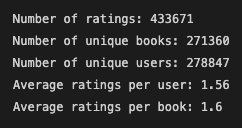
    Key Merged Dataset Statistics

    stats

    Top 10 Books with Highest Ratings Count

    The books with the highest ratings count and mean include:

    counts

    Top 10 User Ratings Count

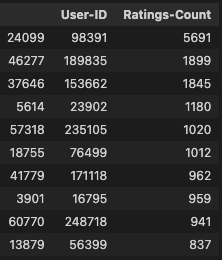
    Below are the top 10 ‘super’ raters:

    user-counts

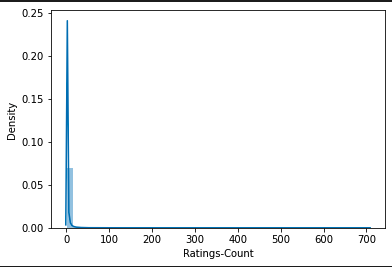
    Histogram – Ratings Count

    Most users don’t rate heavily as shown in the above average ratings per user. Though, some ‘super’ raters do exist as shown in the top 10 user ratings count above.

    histogram-ratings-count

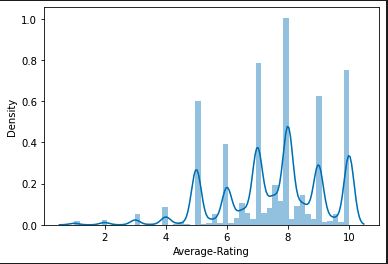
    Histogram – Average Rating

    There are major peaks where books are rated between 5-10.

    histogram-average-rating

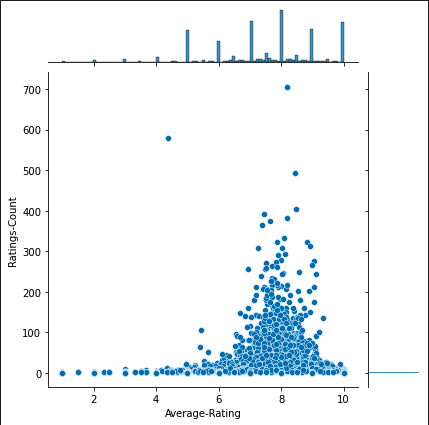
    Histogram – Ratings Average and Count Joint Plot

    Books with the most ratings are largely scored in the 5-10 zone with heavy concentration in the 7-9 zone.

    joint-histogram

    Recommendation System

    In order to feed the data into the machine learning model, the alphanumeric ISBN values had to be assigned unique integer IDs. This process was executed in the following steps:

    1. Use .ravel() method to create array of unique ISBN values and store in book_ids variable.
    2. Cast book_ids array to pandas series.
    3. Convert book_ids to pandas DataFrame
    4. Reset index of book_ids, rename columns to ISBN and Book-ID
    5. Merge book_ids DataFrame with larger merged dataset

    Compressed Sparse Row Matrix

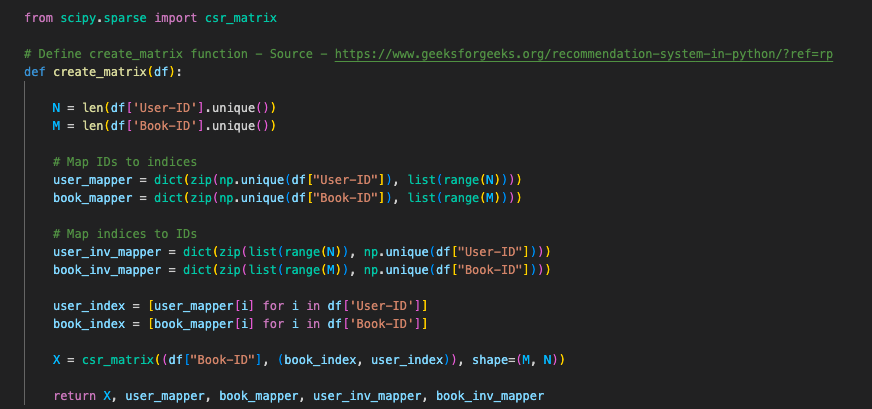
    Leveraging the scipy library, I created a create_matrix function captured below:

    create_matrix

    Then, I feed the mapping values to X in preparation for sklearn’s K-Nearest Neighbours:

    X

    Scikit-Learn’s NearestNeighbours

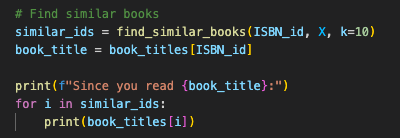
    Next, I create a find_similar_books function to feed the data through the K-Nearest Neighbours machine learning model:

    knn

    Finally, I assign books to a dictionary to feed to the find_similar_books function.

    books-to-dict

    How to Find Recommendations

    In order to find a recommendation, you will need to obtain the Book-ID from the ISBN since the find_similar_books value requires the Book-ID to provide recommendations.

    get-book-id

    find-similar-books

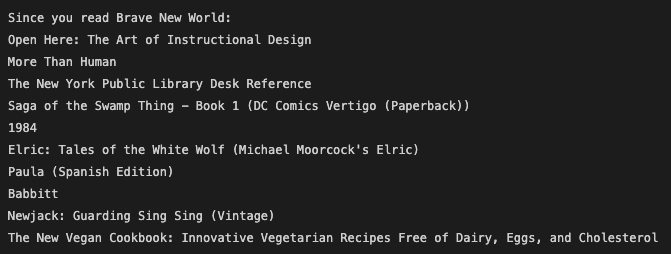
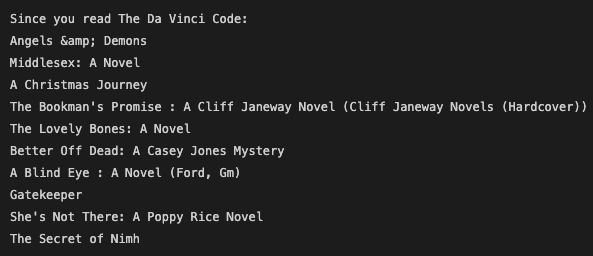
    Recommendation Samples

    Since you read Brave New World:

    brave-new-world

    Since you read The Da Vinci Code:

    da-vinci-code

    Next Steps

    1. Book Title Cleanup – Remove book title duplicates with unique ISBNs
    2. Performance evaluation
    3. Tuning and exploring other machine learning cluserting algorithms for best performance
    This is an ongoing project and will be updated until the best performing recommendation system is developed.

    Resources

    1. Amazon – Cross-referencing null values with BookFinder.com
    2. BookFinder – Cross-referencing null values with Amazon.com
    3. Geeks For Geeks – Find location of an element in pandas dataframe in python
    4. Geeks for Geeks – How to check string is alphanumeric or not using regular expressions
    5. Geeks for Geeks – Recommendation system in Python
    6. Kaggle – Books Dataset
    7. Kaggle – Recommender System for Books
    8. Nick McCullum – Recommendations Systems Python
    9. Stack Overflow – Assign Unique ID to columns pandas dataframe
    10. Scikit-learn – NearestNeighbors
    11. Scikit-learn – Sparse CSR Matrix
    12. Towards Data Science – Handling Sparse Matrix – Concept Behind Compressed Sparse Row (CSR) Matrix
    Visit original content creator repository
  • ytbulk

    YTBulk Downloader

    A robust Python tool for bulk downloading YouTube videos with proxy support, configurable resolution settings, and S3 storage integration.

    Features

    • Bulk video download from CSV lists
    • Smart proxy management with automatic testing and failover
    • Configurable video resolution settings
    • Concurrent downloads with thread pooling
    • S3 storage integration
    • Progress tracking and persistence
    • Separate video and audio download options
    • Comprehensive error handling and logging

    Installation

    1. Clone the repository
    2. Install dependencies:
    pip install -r requirements.txt

    Configuration

    Create a .env file with the following settings:

    YTBULK_MAX_RETRIES=3
    YTBULK_MAX_CONCURRENT=5
    YTBULK_ERROR_THRESHOLD=10
    YTBULK_TEST_VIDEO=<video_id>
    YTBULK_PROXY_LIST_URL=<proxy_list_url>
    YTBULK_PROXY_MIN_SPEED=1.0
    YTBULK_DEFAULT_RESOLUTION=1080p

    Configuration Options

    • YTBULK_MAX_RETRIES: Maximum retry attempts per download
    • YTBULK_MAX_CONCURRENT: Maximum concurrent downloads
    • YTBULK_ERROR_THRESHOLD: Error threshold before stopping
    • YTBULK_TEST_VIDEO: Video ID used for proxy testing
    • YTBULK_PROXY_LIST_URL: URL to fetch proxy list
    • YTBULK_PROXY_MIN_SPEED: Minimum acceptable proxy speed (MB/s)
    • YTBULK_DEFAULT_RESOLUTION: Default video resolution (360p, 480p, 720p, 1080p, 4K)

    Usage

    python -m cli CSV_FILE ID_COLUMN --work-dir WORK_DIR --bucket S3_BUCKET [OPTIONS]

    Arguments

    • CSV_FILE: Path to CSV file containing video IDs
    • ID_COLUMN: Name of the column containing YouTube video IDs
    • --work-dir: Working directory for temporary files
    • --bucket: S3 bucket name for storage
    • --max-resolution: Maximum video resolution (optional)
    • --video/--no-video: Enable/disable video download
    • --audio/--no-audio: Enable/disable audio download

    Example

    python -m cli videos.csv video_id --work-dir ./downloads --bucket my-youtube-bucket --max-resolution 720p

    Architecture

    Core Components

    1. YTBulkConfig (config.py)

      • Handles configuration loading and validation
      • Environment variable management
      • Resolution settings
    2. YTBulkProxyManager (proxies.py)

      • Manages proxy pool
      • Tests proxy performance
      • Handles proxy rotation and failover
      • Persists proxy status
    3. YTBulkStorage (storage.py)

      • Manages local and S3 storage
      • Handles file organization
      • Manages metadata
      • Tracks processed videos
    4. YTBulkDownloader (download.py)

      • Core download functionality
      • Video format selection
      • Download process management
    5. YTBulkCLI (cli.py)

      • Command-line interface
      • Progress tracking
      • Concurrent download management

    Proxy Management

    The proxy system features:

    • Automatic proxy testing
    • Speed-based verification
    • State persistence
    • Automatic failover
    • Concurrent proxy usage

    Storage System

    Files are organized in the following structure:

    work_dir/
    ├── cache/
    │   └── proxies.json
    └── downloads/
        └── {channel_id}/
            └── {video_id}/
                ├── {video_id}.mp4
                ├── {video_id}.m4a
                └── {video_id}.info.json
    

    Error Handling

    • Comprehensive error logging
    • Automatic retry mechanism
    • Proxy failover
    • File integrity verification
    • S3 upload confirmation

    Contributing

    1. Fork the repository
    2. Create a feature branch
    3. Commit your changes
    4. Push to the branch
    5. Create a Pull Request

    License

    MIT License

    Dependencies

    • yt-dlp: YouTube download functionality
    • click: Command line interface
    • python-dotenv: Environment configuration
    • tqdm: Progress bars
    • boto3: AWS S3 integration

    Visit original content creator repository

  • amiko_wx

    amiko_linux

    AmiKo/CoMed for Linux done with wxWidgets and C++, 64 bit.

    Prerequisites:

    • CMake

    • GTK 3

        $ sudo apt install libgtk-3-dev
      
    • WebKit2

        $ sudo apt install libwebkit2gtk-4.0-dev
      
    • SQlite is built-in into the application, so there is no dependency on system libraries.

    • JSON nlohmann

        $ git submodule init
        $ git submodule update
      

      then enable this in steps.conf

        STEP_CONFIGURE_JSON=y
        STEP_BUILD_JSON=y
        STEP_COPY_LANG_FILES=y
      
    • Libcurl

      Install:

        sudo apt install libcurl4-openssl-dev
      

      Or build:

        STEP_DOWNLOAD_SOURCES_CURL=y
        STEP_CONFIGURE_CURL=y
        STEP_BUILD_CURL=y
      
    • OpenSSL development libraries, required for the calculation of the patient hash (SHA256)

        $ sudo apt install libssl-dev
      
    • Smart card support

      • Developers

          $ sudo apt install libpcsclite-dev
        
      • Developers and users

          $ sudo apt install pcscd
        
    • uuidgen for the generation of prescription UUIDs

        $ uuidgen
      
    • To install dependencies on Gentoo:

        $ emerge net-libs/webkit-gtk x11-libs/wxGTK sys-apps/pcsc-lite
      

    Build Script

    1. Download and install latest wxWidgets from source using build script.
    2. Build script also has to download all data files, see OSX version.
    3. Build script has to build executables named AmiKo and CoMed.

    Config Hack

    In the file ~/AmiKo you can set language=57 on the first line. That will put the interface to English. In case you want to test in English.

    Setup

    1. Run build.sh
    2. Edit steps.conf
    3. Edit seed.conf
    4. Run build.sh again.

    Notes when building wxWidgets and SQLite

    1. For Mac in steps.conf

    STEP_CONFIGURE_WXWIDGETS=y
    STEP_COMPILE_WXWIDGETS=y
    
    STEP_CONFIGURE_JSON=y
    STEP_BUILD_JSON=y
    
    1. For Mac in seed.conf
    CONFIG_GENERATOR_MK=y
    

    Notes when building AmiKo/CoMed

    1. For Mac in steps.conf

    STEP_CONFIGURE_APP=y
    STEP_COMPILE_APP=y
    
    1. For Mac in seed.conf
    CONFIG_GENERATOR_XC=y
    

    macOS Installer

    1. Create a .pkg Installer for macOS that installs all the DB files in to ~/.AmiKo or ~/.CoMed

    Visit original content creator repository

  • straug

    Data Augmentation for Scene Text Recognition

    (Pronounced as “strog“)

    Paper

    Why it matters?

    Scene Text Recognition (STR) requires data augmentation functions that are different from object recognition. STRAug is data augmentation designed for STR. It offers 36 data augmentation functions that are sorted into 8 groups. Each function supports 3 levels or magnitudes of severity or intensity.

    Given a source image:

    it can be transformed as follows:

    1. warp.py – to generate Curve, Distort, Stretch (or Elastic) deformations
    Curve Distort Stretch
    1. geometry.py – to generate Perspective, Rotation, Shrink deformations
    Perspective Rotation Shrink
    1. pattern.py – to create different grids: Grid, VGrid, HGrid, RectGrid, EllipseGrid
    Grid VGrid HGrid RectGrid EllipseGrid
    1. blur.py – to generate synthetic blur: GaussianBlur, DefocusBlur, MotionBlur, GlassBlur, ZoomBlur
    GaussianBlur DefocusBlur MotionBlur GlassBlur ZoomBlur
    1. noise.py – to add noise: GaussianNoise, ShotNoise, ImpulseNoise, SpeckleNoise
    GaussianNoise ShotNoise ImpulseNoise SpeckleNoise
    1. weather.py – to simulate certain weather conditions: Fog, Snow, Frost, Rain, Shadow
    Fog Snow Frost Rain Shadow
    1. camera.py – to simulate camera sensor tuning and image compression/resizing: Contrast, Brightness, JpegCompression, Pixelate
    Contrast Brightness JpegCompression Pixelate
    1. process.py – all other image processing issues: Posterize, Solarize, Invert, Equalize, AutoContrast, Sharpness, Color
    Posterize Solarize Invert Equalize
    AutoContrast Sharpness Color

    Pip install

    pip3 install straug
    

    How to use

    Command line (e.g. input image is nokia.png):

    >>> from straug.warp import Curve
    >>> from PIL import Image
    >>> img = Image.open("nokia.png")
    >>> img = Curve()(img, mag=3)
    >>> img.save("curved_nokia.png")
    

    Python script (see test.py):

    python3 test.py --image=<target image>

    For example:

    python3 test.py --image=images/telekom.png

    The corrupted images are in results directory.

    If you want to randomly apply only the desired augmentation types among multiple augmentations, see test_random_aug.py

    Reference

    • Image corruptions (eg blur, noise, camera effects, fog, frost, etc) are based on the work of Hendrycks et al.

    Citation

    If you find this work useful, please cite:

    @inproceedings{atienza2021data,
      title={Data Augmentation for Scene Text Recognition},
      author={Atienza, Rowel},
      booktitle={Proceedings of the IEEE/CVF International Conference on Computer Vision},
      pages={1561--1570},
      year={2021}
    }
    
    Visit original content creator repository